






It’s the last quarter of 2026. Love it or hate it, a growing number of your customers are not typing “car stereo store near me” into a search bar anymore. They’re asking an assistant, and getting back one answer instead of ten links.
Here’s the part most shop owners haven’t connected. That answer is built largely from your Google Business Profile. If yours is unclaimed, out of date, or half empty, you are not in that answer. Your competitor is.
The good news is the audit takes about five minutes!
Start By Looking At Yourself As a Customer Does
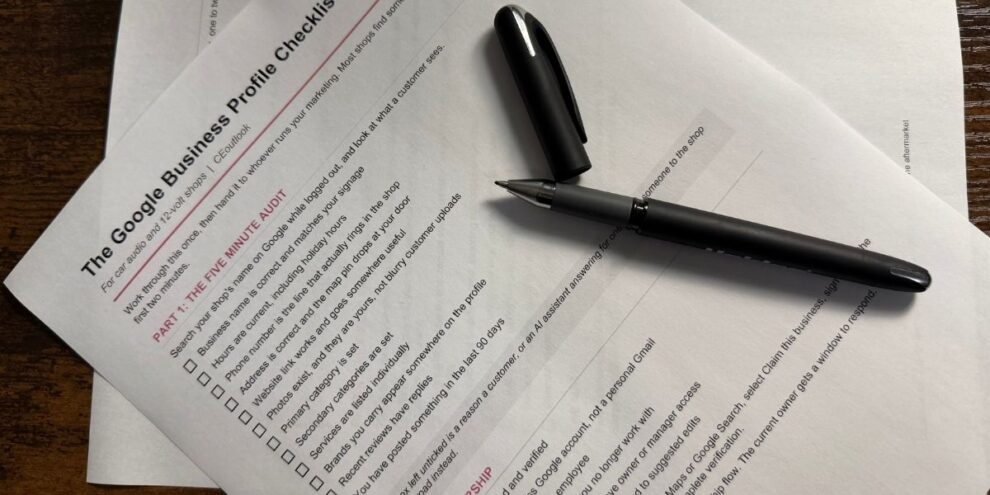
Search your shop’s name on Google. Don’t log into anything yet. Then check:
- Are the hours right, including holidays?
- Is the phone number the one that actually rings in the shop, or the one from two systems ago?
- Are there photos, and did you take them, or are they blurry ones customers uploaded?
- What category are you listed under?
- Do the brands you carry appear anywhere at all?
- When did you last post anything?
If that took you under five minutes and you didn’t like what you saw, everything below is the fix.
Subscribers get a FREE printable Google Business checklist –> here <–
If You’ve Already Claimed It
You’re in the easy lane. Sign in to the Google account that manages the profile and search your business name on Google, or open the Google Business Profile app. Your management tools appear right in the search result. Update hours, phone, website, categories, services, products and photos directly from there. No verification needed, and changes go live within minutes to a day.
The only trap here is access. If the profile is tied to a former employee’s personal Gmail, or a marketing company you no longer use, sort that out now. Add yourself as an owner while you still have someone who can grant it.
If You’ve Never Claimed It
Find your business on Google Maps or Google Search. If a listing already exists, and for most established shops one does whether you made it or not, you’ll see “Claim this business” or “Own this business?” Select it.
Sign in with the Google account that should own this for the long term. That account becomes primary owner. Use a business account, not a personal one, and not an employee’s.
Then comes verification, and this is the part nobody warns you about. In 2026 Google defaults to video verification for most claims. One continuous recording, one to two minutes, thirty seconds minimum, showing:
- Your exterior signage with the business name
- You entering and unlocking the door
- Enough of the inside to prove it’s a real operating business: the install bay, your equipment, your display wall
- No faces and no documents, which Google specifically asks you to avoid
Some older unclaimed listings still get the phone or email option, which is instant. Postcard verification, the old standard, is mostly gone.
Review time varies. Video submissions are often approved within a few business days, sometimes faster. So call it five minutes of work and up to a week of waiting.
Claim It Before Someone Else Does
An unclaimed profile is an unlocked door. Anyone can attempt to claim it, and until someone does, Google lets the public suggest edits to your hours, your phone number, even your address. Those edits can go live without anyone at your shop knowing.
It doesn’t take malice to cost you money. A wrong phone number or a listing showing you closed on Saturdays quietly sends customers down the road for months before anybody notices. But it can be malice, and in this industry it has been. A competitor marking you permanently closed is not a hypothetical.
That risk gets bigger, not smaller, as AI enters the picture. A bad edit used to sit on a page a customer might question. Now an assistant reads that listing and repeats it as fact, with no link for the customer to second guess. Wrong information doesn’t just sit there anymore. It gets spoken out loud as the answer.
Claiming the profile is what closes that door. As the verified owner you control the information, you get notified when someone suggests a change, and you can reject it.
If Someone Else Already Claimed It
This happens more than you’d think, usually a previous owner or an agency from years ago. Google will tell you the profile is already managed and show you a partly hidden email. Request ownership through that flow. The current owner gets a window to respond. If they don’t, you can usually claim it yourself.
Now The Part That Actually Feeds The AI Answer
Claiming is the foundation. These fields are what determine whether you show up when a customer asks for what you actually sell.
CATEGORIES: Most car audio shops set “Car Stereo Store” and stop. Add every secondary category that applies: auto electronics, remote starter, window tinting, marine, car alarm.
SERVICES: List them individually and specifically. Remote start installation. Sound deadening. Marine audio. Lighting. Backup cameras. Each one is a query someone is typing or asking out loud.
PRODUCTS AND BRANDS: If you’re an authorized dealer, say so, by name. “Who sells Arc Audio near me” is a real question, and this is the field that answers it.
PHOTOS: Real ones. Exterior so people can find your door, your bay, your work, your team. Swap them a few times a year.
QUESTIONS AND ANSWERS: You can post questions yourself and answer them. Use the ones you field on the phone all day.
REVIEWS: Respond to them, good and bad. That text is indexed too, and it’s one of the strongest signals in local ranking.
The Math
Five minutes to see where you stand. An afternoon to fill it out properly. Possibly a week to get verified.
Your competitor down the road either did this in 2014 and abandoned it, or never did it at all. Either way, there’s an opening. And the shop that fills it is the one the assistant names when a customer asks.
Get the news before your competitors do. CEoutlook is the daily brief read by over 6,500 dealers, reps and manufacturers across the mobile electronics industry. Subscribe free.


